Add your promotional text...

Children Safety System
BLUETOOTH MODULE
Vikrant Singh
8/24/20241 min read
Project Overview
To create a system that monitors the distance between a child and the TV using an IR sensor. If the child is too close to the TV, the system will automatically turn off the TV and light up an "OFF" LED. The TV will turn back on and light up an "ON" LED when the child moves to a safe distance.
Components
1. Arduino Uno
2. IR Sensor
3. Relay
4. Jumper Wires
5. Breadboard
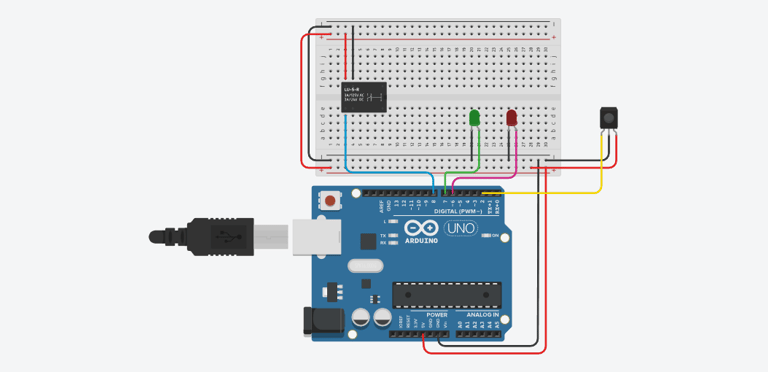
Circuit Diagram :
Steps to Build the Project :
Connect the IR Sensor to Arduino:
VCC → 5V on Arduino Nano
GND → GND on Arduino Nano
OUT → Digital Pin D2 on Arduino Nano
Connect the Relay to Arduino:
VCC to 5V
GND to GND
IN to digital pin 8 on the Arduino
Arduino Code :
int irSensor = 2; // IR sensor connected to digital pin D2
int relayPin = 8; // Relay module connected to digital pin D8
int greenLed = 7; // Green LED connected to digital pin D7 (TV ON)
int redLed = 6; // Red LED connected to digital pin D6 (TV OFF)
int sensorValue = 0; // Variable to store IR sensor value
void setup() {
pinMode(irSensor, INPUT);
pinMode(relayPin, OUTPUT);
pinMode(greenLed, OUTPUT);
pinMode(redLed, OUTPUT);
digitalWrite(relayPin, HIGH); // Initially, TV is ON
digitalWrite(greenLed, HIGH); // Green LED ON (TV ON)
digitalWrite(redLed, LOW); // Red LED OFF
Serial.begin(9600); // Initialize serial communication
}
void loop() {
sensorValue = digitalRead(irSensor); // Read IR sensor value
if (sensorValue == HIGH) { // Object detected within unsafe distance
Serial.println("Child too close! Turning off TV...");
digitalWrite(relayPin, LOW); // Turn off the TV
digitalWrite(redLed, HIGH); // Red LED ON (TV OFF)
digitalWrite(greenLed, LOW); // Green LED OFF
} else { // Safe distance
Serial.println("Safe distance. TV is ON.");
digitalWrite(relayPin, HIGH); // Turn on the TV
digitalWrite(greenLed, HIGH); // Green LED ON (TV ON)
digitalWrite(redLed, LOW); // Red LED OFF
}
delay(500); // Small delay to stabilize the sensor reading
}
Testing the System :
Connect the IR Sensor, relay module, and LED as per the circuit diagram.
Upload the code to the Arduino using the Arduino IDE.
***Happy Tinkering***