Add your promotional text...

Smart Dustbin
MOTION SENSOR
Vikrant Singh
8/27/20241 min read
Project Overview
In this project, we will create a smart dustbin that automatically opens its lid when someone approaches it and closes the lid after a short delay or when the person moves away. This automation will be achieved using an ultrasonic distance sensor to detect proximity and a servo motor to control the dustbin's lid.
Components
Arduino Uno
Ultrasonic Distance Sensor (HC-SR04)
Servo Motor
Breadboard and Connecting Wires
Power Supply (5V for Arduino and Servo)
USB cable for Arduino Uno programming
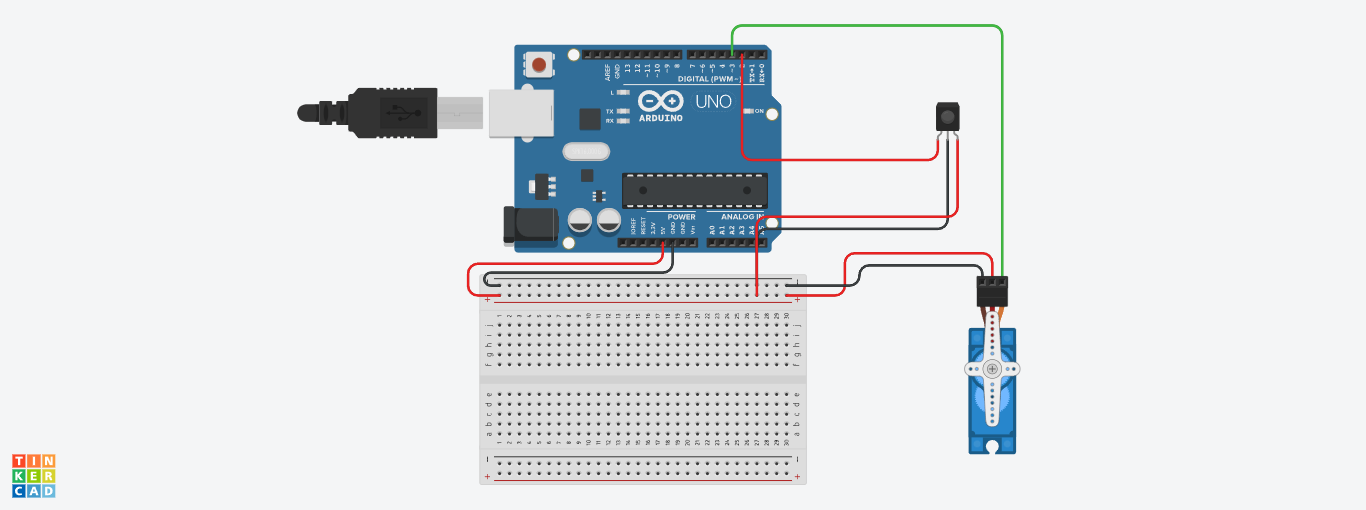
Circuit Diagram :
Steps to Build the Project :
Connect the IR Sensor to Arduino:
VCC → 5V on Arduino Nano
GND → GND on Arduino Nano
OUT → Digital Pin 2 on Arduino Nano
Connect the Servo Motor to Arduino:
Signal (Control) → Digital Pin 3 on Arduino Uno
VCC → 5V on Arduino Uno
GND → GND on Arduino Uno
Arduino Code :
#include <Servo.h>
#define IR_SENSOR_PIN 2 // IR sensor connected to digital pin D2
#define SERVO_PIN 9 // Servo motor connected to digital pin D9
#define OPEN_POSITION 90 // Angle to open the dustbin lid
#define CLOSE_POSITION 0 // Angle to close the dustbin lid
Servo servo;
void setup() {
pinMode(IR_SENSOR_PIN, INPUT);
servo.attach(SERVO_PIN);
servo.write(CLOSE_POSITION); // Start with the lid closed
Serial.begin(9600);
}
void loop() {
int sensorValue = digitalRead(IR_SENSOR_PIN);
if (sensorValue == LOW) { // Object detected (IR sensor output is LOW when detecting)
Serial.println("Object detected. Opening lid...");
servo.write(OPEN_POSITION); // Open the lid
delay(5000); // Keep the lid open for 5 seconds
servo.write(CLOSE_POSITION); // Close the lid
} else {
Serial.println("No object detected.");
}
delay(200); // Small delay for stability
}
Testing the System :
Connect the IR Sensor, Servo Motor, and LED as per the circuit diagram.
Upload the code to the Arduino using the Arduino IDE.
***Happy Tinkering***