Add your promotional text...

TEMPERATURE MONITORING SYSTEM
TEMPERATURE SENSOR
Vikrant Singh
7/29/20242 min read
Project Overview
In this project, we will create a temperature and humidity monitoring system using a DHT11 or DHT22 sensor and an Arduino. The system will display the temperature and humidity readings on an LCD screen and print them on the Serial Monitor.
Components
1. Arduino Uno
2. DHT 11 OR 22
3. I2C LCD
4. Jumper Wires
5. Breadboard
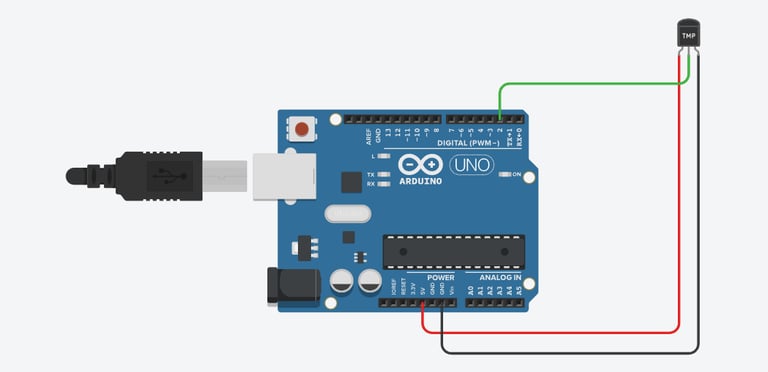
Circuit Diagram :
Steps to Build the Project :
Connect the DHT Sensor to Arduino:
Connect the VCC pin of the DHT sensor to the 5V pin on the Arduino.
Connect the GND pin of the DHT sensor to the GND pin on the Arduino.
Connect the DATA pin of the DHT sensor to digital pin 2 on the Arduino.
Connect the LCD Display to Arduino:
Connect the VCC pin of the I2C module on the LCD to the 5V pin on the Arduino.
Connect the GND pin of the I2C module on the LCD to the GND pin on the Arduino.
Connect the SDA pin of the I2C module on the LCD to the A4 pin on the Arduino.
Connect the SCL pin of the I2C module on the LCD to the A5 pin on the Arduino.
Arduino Code :
#include <Wire.h>
#include <LiquidCrystal_I2C.h>
#include <DHT.h>
#define DHTPIN 2 // Pin where the DHT sensor is connected
#define DHTTYPE DHT11 // DHT 11
DHT dht(DHTPIN, DHTTYPE);
LiquidCrystal_I2C lcd(0x27, 16, 2); // I2C address 0x27, 16 column and 2 rows
void setup() {
lcd.begin();
lcd.backlight();
dht.begin();
Serial.begin(9600); // Initialize serial communication for debugging
lcd.print("Temp & Humidity");
delay(2000);
lcd.clear();
}
void loop() {
float h = dht.readHumidity();
float t = dht.readTemperature();
if (isnan(h) || isnan(t)) {
lcd.setCursor(0, 0);
lcd.print("Failed to read");
lcd.setCursor(0, 1);
lcd.print("from DHT sensor");
Serial.println("Failed to read from DHT sensor");
return;
}
lcd.setCursor(0, 0);
lcd.print("Temp: ");
lcd.print(t);
lcd.print(" C");
lcd.setCursor(0, 1);
lcd.print("Humidity: ");
lcd.print(h);
lcd.print(" %");
Serial.print("Temperature: ");
Serial.print(t);
Serial.print(" C, Humidity: ");
Serial.print(h);
Serial.println(" %");
delay(2000);
}
Testing the System :
Connect the DHT sensor and LCD display as per the circuit diagram.
Upload the code to the Arduino using the Arduino IDE.
Open the Serial Monitor in the Arduino IDE to observe the temperature and humidity readings.
Observe the LCD display: It should show the temperature in Celsius and humidity in percentage.
If the sensor readings fail, it will display an error message.
***Happy Tinkering***