Add your promotional text...

VISITOR COUNTER
MOTION SENSOR
Vikrant Singh
7/29/20241 min read
Project Overview
In this project, we will create a visitor counter using two IR sensors and an Arduino. One IR sensor will be placed at the entrance to detect when a visitor enters, and the other IR sensor will be placed at the exit to detect when a visitor leaves. The visitor count will be displayed on the Serial Monitor.
Components
1. Arduino Uno
2. 2 x IR Sensors (with digital output)
3. I2C LCD
4. Jumper Wires
5. Breadboard
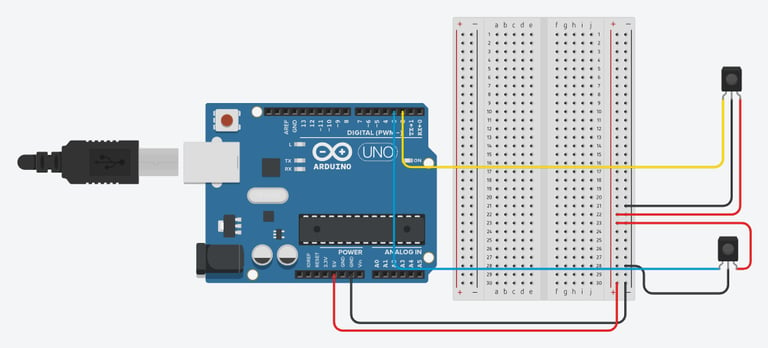
Circuit Diagram :
Steps to Build the Project :
Connect the IR Sensor to Arduino:
Connect the VCC pin of the IR sensor to the 5V pin on the Arduino.
Connect the GND pin of the IR sensor to the GND pin on the Arduino.
Connect the output pin of the IR sensor to digital pin 2 & 3 on the Arduino.
Connect the LCD Display to Arduino:
Connect the VCC pin of the I2C module on the LCD to the 5V pin on the Arduino.
Connect the GND pin of the I2C module on the LCD to the GND pin on the Arduino.
Connect the SDA pin of the I2C module on the LCD to the A4 pin on the Arduino.
Connect the SCL pin of the I2C module on the LCD to the A5 pin on the Arduino.
Arduino Code :
#define IR_SENSOR_ENTRANCE 2
#define IR_SENSOR_EXIT 3
int visitorCount = 0;
void setup() {
pinMode(IR_SENSOR_ENTRANCE, INPUT);
pinMode(IR_SENSOR_EXIT, INPUT);
Serial.begin(9600); // Initialize serial communication
Serial.println("Visitor Counter Initialized");
}
void loop() {
if (digitalRead(IR_SENSOR_ENTRANCE) == LOW) {
visitorCount++;
Serial.print("Visitor Entered: ");
Serial.println(visitorCount);
delay(1000); // Debounce delay
}
if (digitalRead(IR_SENSOR_EXIT) == LOW) {
visitorCount--;
Serial.print("Visitor Exited: ");
Serial.println(visitorCount);
delay(1000); // Debounce delay
}
}
Testing the System :
Connect the IR sensors as per the circuit diagram.
Upload the code to the Arduino using the Arduino IDE.
Open the Serial Monitor in the Arduino IDE.
Set the Baud Rate in the Serial Monitor to 9600.
Test the System:
Place an object (simulating a visitor) in front of the entrance IR sensor. The visitor count should increment.
Place the object in front of the exit IR sensor. The visitor count should decrement.
***Happy Tinkering***